Understanding AI Credit in ACE Studio
What is AI Credit?
AI Credit is the token required for ACE Studio users to access features related to music AI models. Currently, the Advanced Stem Splitter and Generative Kits (including Inspire Me, Add a Layer, and Music Enhancer) in the desktop app, as well as features like Video to Music, Video to SFX, Text to Sample, and Stem Splitter on the web, require the use of Credits.
| Desktop App Feature | Credit Consumed |
|---|---|
|
Inspire Me
|
15
|
|
Add a layer
|
20
|
|
Music Enhancer
|
3 for upload, 12 for generation
|
|
Stem Splitter:Standard, Vocal + Instrumental
|
0
|
|
Stem Splitter:Standard, Vocal + Drums + Bass + Instruments
|
0
|
|
Stem Splitter:Advanced,All Stems detected
|
60
|
| Stem Splitter:Customized | 5 |
| SFX Tool (standalone) | 5 |
|
Video Composer - Music Generation
|
100 |
|
Video Composer - SFX
|
10 |
| Music Video | Refer to: https://docs.acestudio.ai/ai-tools/music-video#credit-pricing |
How to Obtain AI Credit?
All registered users receive a monthly refresh of AI Credit on the 1st day of each month (Pacific Time). When the monthly credit refreshes, the unused credit from the previous month will be cleared, and new credits will be issued based on your plan:
- Artist: 2500 Monthly Credits
- Artist Pro: 5000 Monthly Credits
- Other Registered Users: 100 Monthly Credits
Flexible Usage: Change your pack size anytime as your needs grow.
Rollover Credits: Unused add-on credits will roll over to the next month. (For details on rollover, please refer to the "Do AI Credits Roll Over? ")
You can cancel anytime, but purchased credits are non-refundable.
How Does Downgrading a Plan Affect AI Credit?
Downgrading your plan will not affect the AI Credit issued for the current month. However, when credits refresh next month, they will be issued according to the plan active at that time.
What If I Run Out of AI Credits?
You can get more monthly AI Credits by upgrading your Artist subscription to Artist Pro, or by adding extra AI Credit Packs to your account.
How to Subscribe to a Credits Pack?
- Only customers with an active subscription (i.e., you still have remaining membership days under “Credits & Membership”) can purchase a Credits Pack.
- You can check your status here: https://acestudio.ai/app/account/manage-subscription.

Do AI Credits Roll Over?
If, at the end of a month, your remaining credits are higher than your plan’s base credits, the extra credits will roll over to the 1st of the next month.
On the 1st of each month, you receive:
Base credits for your plan + any rolled‑over credits from Credits Packs.
Example
- Your subscription gives you 5,000 base credits/month.
- You subscribe to a 2,500‑credit Pack and now have 7,500 credits this month (5,000 base + 2,500 from the pack).
- You use 1,000 credits, so 6,500 credits remain.
- Since 6,500 is more than your 5,000 base credits, the extra 1,500 credits roll over.
- On the 1st of next month, you get: 5,000 base + 1,500 rolled over = 6,500 credits.
How to Cancel a Credits Pack Subscription?
To cancel your Credits Pack subscription, please follow these steps:
- Go to the "Manage Subscriptions" page.
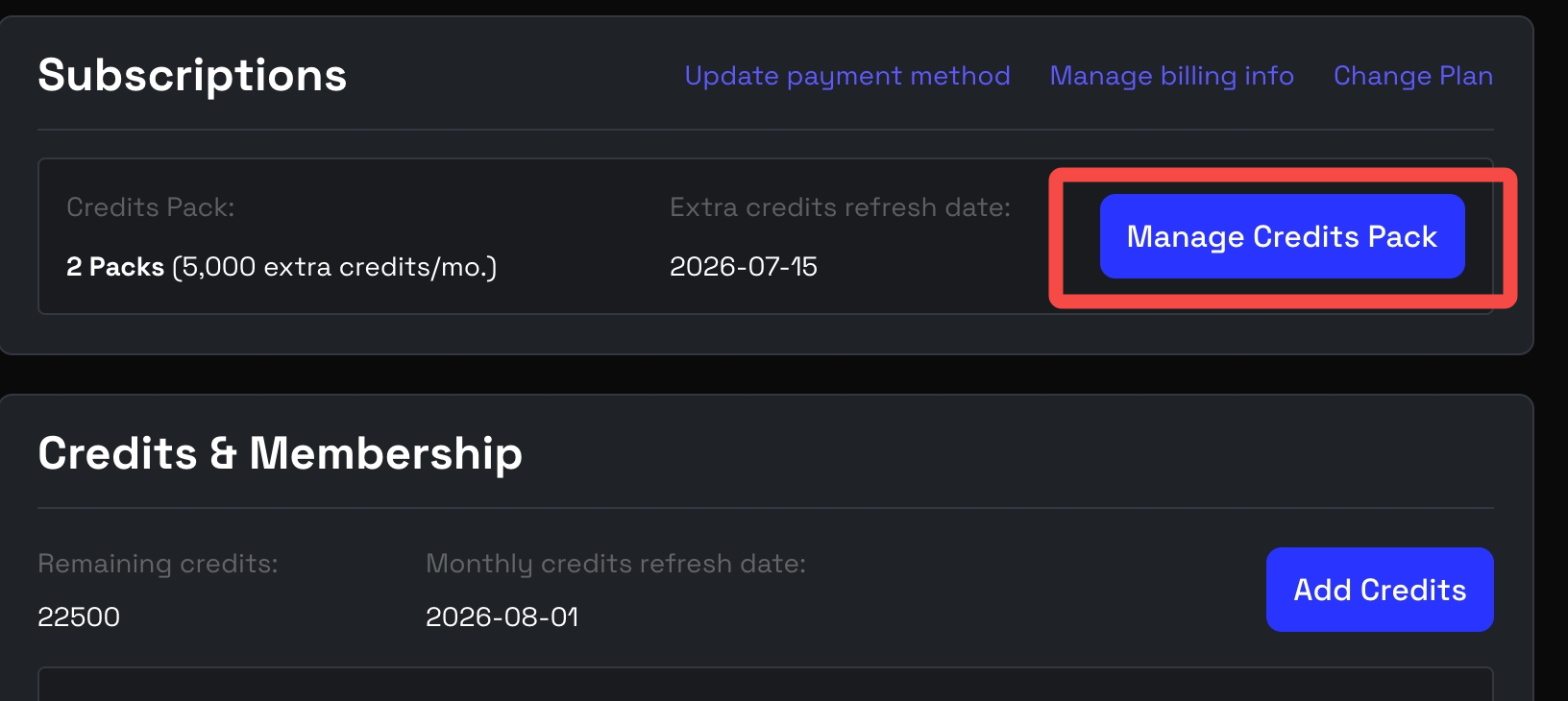
- Go to "Subscriptions" and select "Manage Credits Pack".
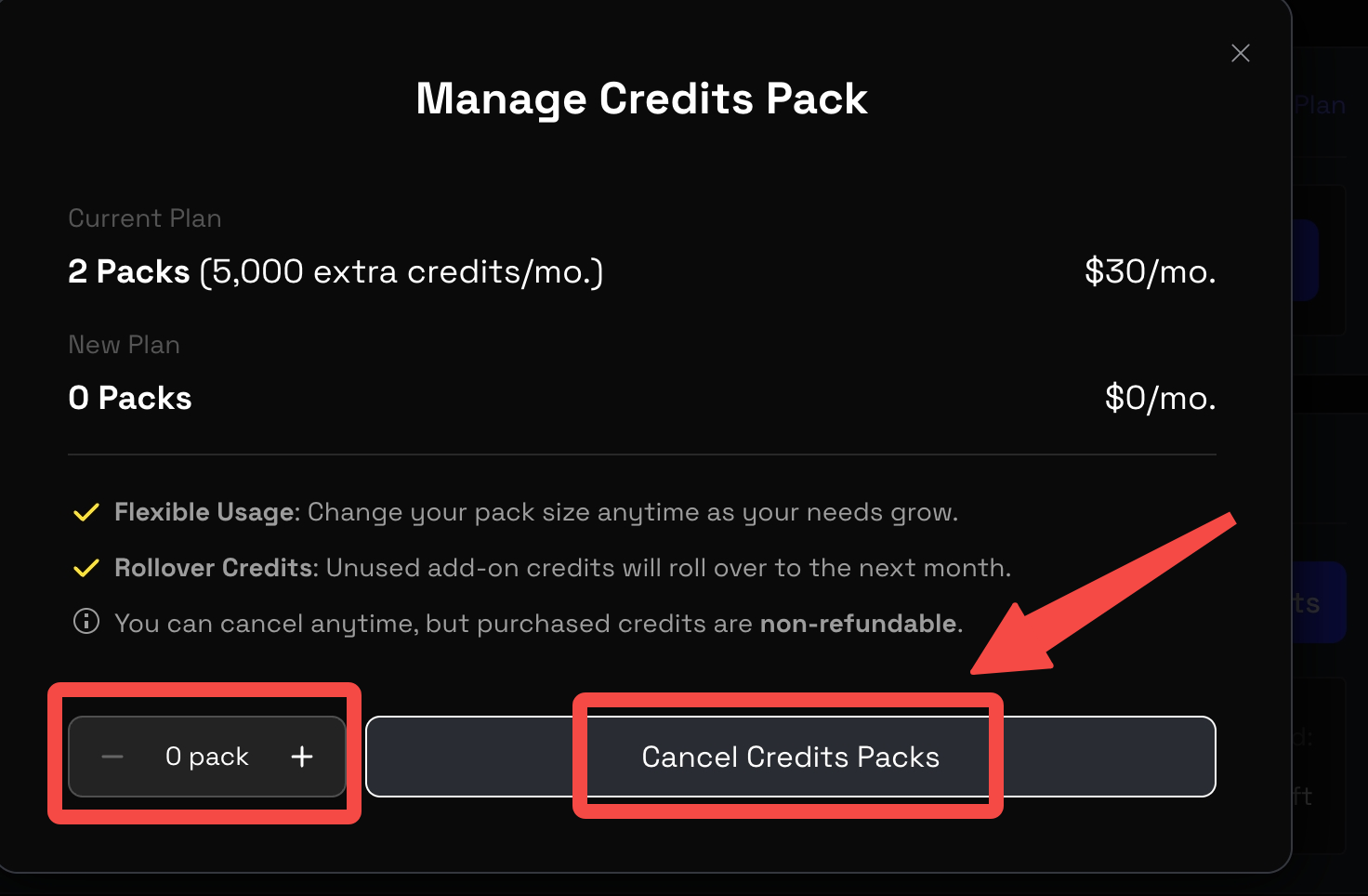
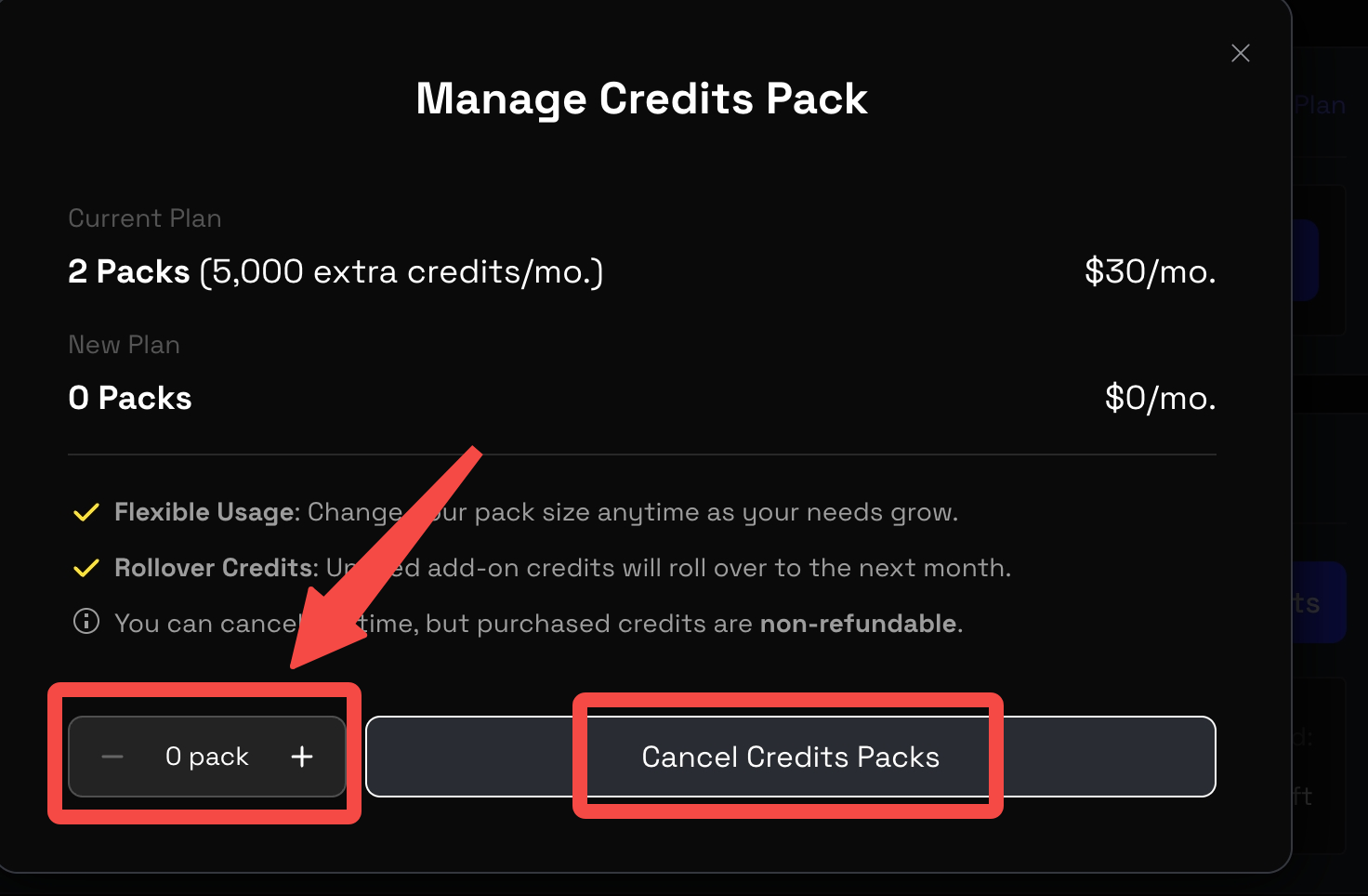
- Drag the Credits Pack down to 0.
- Click the gray “Cancel Credits Packs” button to complete the cancellation.